Everything you need to control cost.
StockWisely connects recipes, purchases, waste, and stock into one system. Every number comes from your real data — not estimates or averages.
Product & ingredient catalogue
Build an organised catalogue of kitchen products and ingredients. Assign measurement units, departments, VAT rates, item codes, barcodes, pack sizes, prices and waste percentages for consistent costing across each restaurant location.
Recipe costing
Calculate plate cost and food-cost percentage from ingredient quantities, measurement units, VAT, prices and preparation waste. Recipe costs update when ingredient data changes, helping you maintain accurate selling prices without rebuilding calculations manually.
Waste calculation
Measure preparation loss by comparing purchased weight with usable production weight. StockWisely calculates the waste quantity and percentage, updates the product’s usable cost, and includes that result in recipe costing.
Recipe books
Create main dishes and reusable preparation recipes with ingredients, quantities, images, processing notes and step-by-step instructions. Organise recipes by kitchen section and provide printable, read-only guidance for consistent preparation.
Menu management
Build food and beverage menus from costed recipes and direct-sale products. Create custom sections, arrange items, review prices and food-cost percentages, assign POS codes, design guest-facing descriptions and export menus for printing.
Menu engineering
Analyse menu items by sales quantity, popularity, contribution and gross profit. Identify high-performing dishes, low-margin items and opportunities to adjust prices, portions or menu placement.
Production & ordering
Use menu sales and guest forecasts to calculate production quantities and ingredient requirements. Expand recipes, subtract current stock, group preparation by kitchen section, and create editable, printable production and ordering sheets.
Excel product import
Upload products and ingredients in bulk using the StockWisely spreadsheet template. Create or update catalogue records, item codes, barcodes, prices, VAT, departments and measurement details without entering every product manually.
Team member access
Invite managers and team members with access scoped to their assigned locations. Control operational access by role. Additional Team Member billing applies, and paid Recipe Viewer access is available for staff who only need assigned recipes and production reports.
Multiple locations
Manage multiple restaurant locations under one company account. One initial unit is included. Keep products, recipes, menus, production reports and teams scoped to each unit while maintaining central ownership and control. Standard additional-unit access is €10 per month where applicable.
Real-time inventory
Track stock quantities and average costs across every location. Purchases, sales, transfers, adjustments, returns and stocktakes update inventory through controlled transactions, giving teams a current view of what is available and where it is held.
Purchases & purchase returns
Record supplier invoices, allocate costs to products, and process credits and purchase returns. Posted purchase prices update inventory value and recipe costing automatically, keeping plate costs aligned with what the business actually pays.
Sales & sales returns
Record or import sales and manage customer returns with a complete document history. Connect revenue with recipe and product costs to review sales value, quantities, margins and stock impact by item and reporting period.
Stocktakes
Complete full stocktakes by location and compare counted quantities with system stock. Review item and category variances, record reasons, generate inventory adjustments, and measure food, beverage and other cost against sales.
Inventory consumption & cost of sales
Measure actual consumption between stocktakes and compare it with sales and theoretical cost. Analyse food, beverage and other cost percentages, purchases, transfers, adjustments, waste and unexplained variance by reporting group.
Stock transfers
Move products between locations with controlled transfer documents and a complete audit trail. Track the source, destination, quantities, costs and posting status so inventory remains accurate across every restaurant or storage location.
AI-assisted document capture
When enabled, upload or photograph supplier invoices and sales reports from desktop or mobile. StockWisely extracts structured information, matches products and menu items, and prepares reviewable drafts before anything changes inventory.
ERP, POS & API integrations
Connect ERP, POS and private systems through secure, scoped API tokens. Sync products and suppliers, import stock-moving documents, manage external item mappings, restrict access by location, and monitor integration requests and errors.
Supplier management
Maintain supplier contacts, payment terms and product associations in one organised directory. Review purchasing history, preferred suppliers and the latest recorded product prices to support purchasing decisions and keep ingredient costs current.
Analytics dashboard
Monitor food cost, waste, margin, stock value and operational trends from a single management view. Identify unusual changes early, compare performance over time and focus attention on the areas with the greatest financial impact.
Reports suite
Review cost, sales, stock movement, waste, stocktake and consumption reports from one place. Filter results by date, location, product or category, investigate operational differences, and export detailed spreadsheet data.
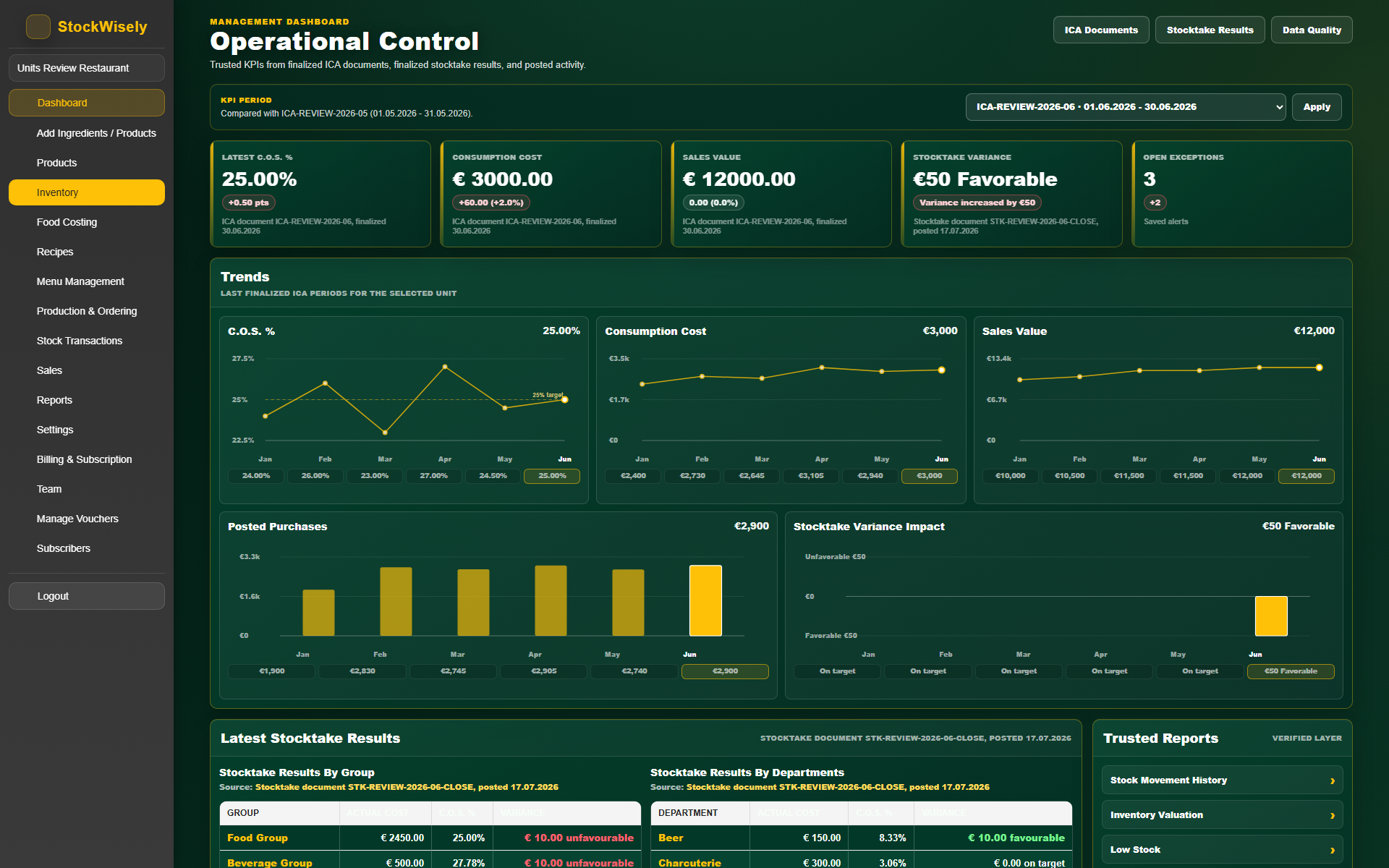
Operational Control dashboard
A Premium management view built from finalized ICA documents, posted activity, and stocktake results — food-cost KPIs, sales, consumption, stocktake variance, and six-month trend charts in one place.
Recipe Viewer access
Give front-of-house staff or production teams read-only access to recipe books and production orders. They can view, print, and follow recipes — but cannot edit costs, prices, or product data.
Not currently in StockWisely
Recipe scanning and AI recipe extraction are not yet available. AI invoice extraction is implemented and available when configured for your deployment. If you need a feature not listed here, contact us — the roadmap is shaped by real customer requests.